
Using AI
No API? When to Let a Browser Agent Do the Clicking

No API? When to Let a Browser Agent Do the Clicking
Use a browser agent when a system has no workable API and the task is repetitive, low-risk and easy to verify. It can bridge a manual process, provided someone owns interruptions and checks the result. Start read-only on a dedicated account, with a human fallback, and keep payment authority outside the agent's reach.
Key takeaways
- Browser agents fit repetitive, low-risk tasks with results you can verify.
- Start read-only with a dedicated account and narrowly limited access.
- Plan for page changes, expired logins and human authentication steps.
- Keep a useful action record and a human fallback for interrupted runs.
THE MISSING BRIDGE
Why use a browser agent when there is no API?
Use the browser for permitted, repeatable work. An API lets software request information or actions directly; a browser agent works through the pages a person sees. You remain responsible for access, verification and recovery when the system's permitted route requires someone to click through its pages.
In the engagements we run at Vista, supplier portals, older industry software and government sites often lack the API our small-business clients need. Those systems can still be central to daily operations. The resulting process depends on someone signing in, finding the right page and transferring information by hand.
Picture the weekly invoice pull that still depends on someone copying information by hand. Every Monday someone logs into a supplier portal, downloads last week's invoices and retypes the totals into the books. That is the job a browser agent can take.
One composite from our work involved browser automation on a dedicated profile handling nightly data pulls reliably until a vendor redesigned a page. The fix was monitoring and a human fallback, not a smarter agent. The task had to stop safely when the expected page and result no longer matched.
A side benefit we see in our engagements is a step-by-step log the manual process never captured. That log helps explain where work stalls and which exceptions keep returning. Logging must be part of the setup; do not assume every assistant automatically provides a complete, usable log.
Minimum Blast Radius. Vista's framework limits what can go wrong while a workflow proves itself. Start read-only on a dedicated account, such as an extra read-only user seat the site provides. Widen the scope only after results and recovery have been checked.
Major assistants can now operate a browser. OpenAI documents that ChatGPT Work can read, click and type into web pages using its own browser. Use that capability for a defined task, then check the result before scheduling it to run unattended.
OpenAI's own browser documentation notes that some sites block automated browsers or require a CAPTCHA. Treat either as a no. Stop the run and ask the site for an export or approved access before considering any new attempt at that task.
Anthropic documents that Claude in Chrome can read pages, navigate, click, type and fill forms. The decision still depends on your task and its consequences. A browser-capable assistant does not remove the need to define the permitted pages, stopping conditions and finished result.
- Check whether the system already offers a usable export or integration.
- Define the exact result the manual process is meant to produce.
- Identify the point where a person must intervene if the run stops.
THE TASK TEST
Which tasks get a go, caution or no?
One no is enough. Use browser agents for repeatable information gathering when you can contain errors and check the result against the source. Keep write access supervised, and reject irreversible, payment-related or prohibited actions even when the other task traits look promising.
| Task trait | Go | Caution | No |
|---|---|---|---|
| Frequency | A recurring task with a consistent purpose. | Occasional work whose setup may exceed the time saved. | An urgent one-off task that cannot tolerate a failed attempt. |
| Reversibility | Read-only retrieval into a reviewable copy. | Drafting or reversible updates with explicit approval boundaries. | Irreversible changes, payment authority or binding submissions. |
| Result verification | Expected period, records and destination can be checked. | Result needs a knowledgeable person to review exceptions. | Nobody can distinguish a correct result from a plausible one. |
| Login and two-factor | Authorized access with a person available for required authentication. | Frequent expiry or unpredictable prompts interrupt the schedule. | The site shows a CAPTCHA or bot check, or the task would require bypassing access controls or sharing an account. |
| Site terms of use | The site's terms permit the intended automated activity. | Permission is unclear and needs clarification before the pilot. | The site prohibits the intended activity or access has been denied. |
| Access and data | A dedicated account can see only the records needed. | The account exposes extra data that needs to be restricted first. | The task cannot be separated from unrelated sensitive access. |
Assess the full task, including where the retrieved information goes next. A read-only portal visit can still produce a bad outcome if its unverified output overwrites a trusted record. Save the output for review, and mark it unfinished until it passes the checks your business uses for trusted information.
Do not let the absence of an API become a reason to accept any workaround. Our guide to checking what you already pay for before building starts with the available options. A scheduled export or existing supported integration may give you a simpler path with less ongoing supervision.
- Continue only when the intended activity is permitted and the account is appropriate.
- Keep caution tasks supervised until the interruption and review process works.
- Stop the proposal when any no condition remains part of the required scope.
THE BREAK POINTS
What breaks, and how do you absorb it?
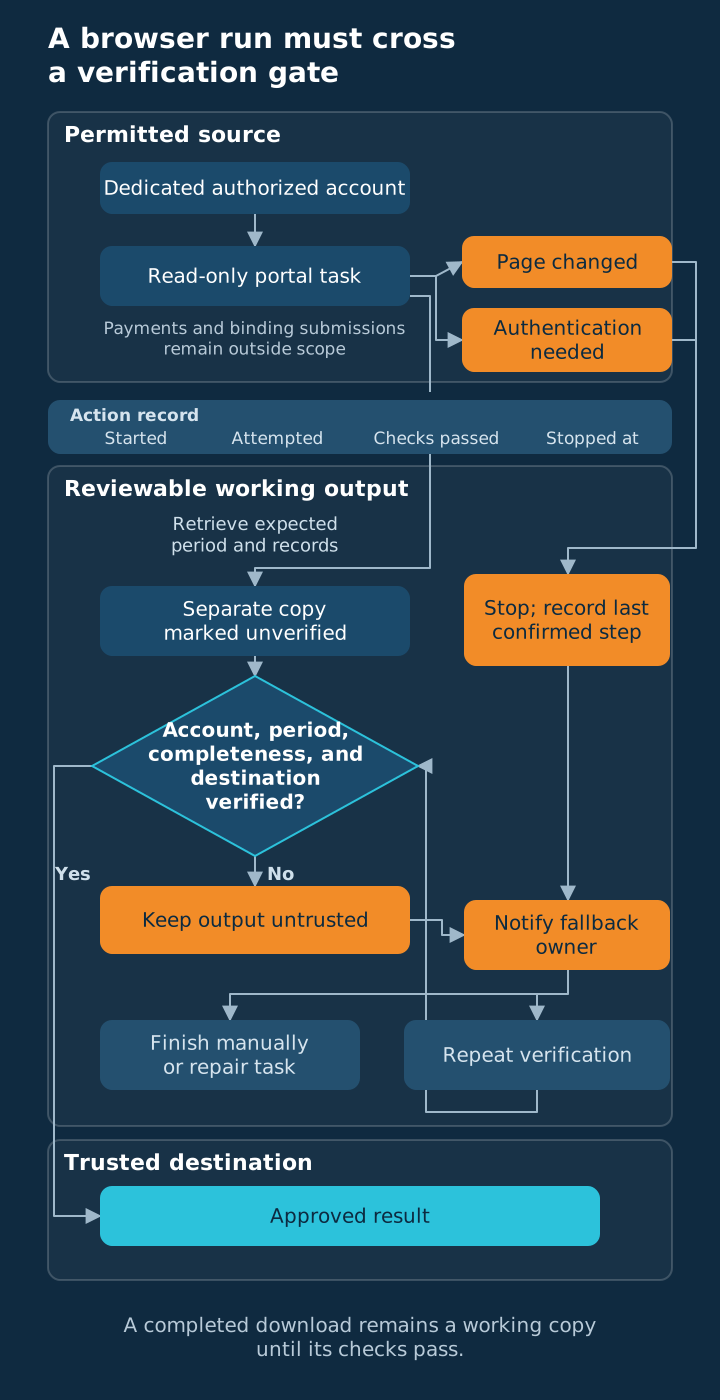
Stop when the page stops matching. Plan around page changes, interrupted sessions and uncertain results instead of expecting a perfect run every time. Build failure notifications that tell you what remains unfinished, so you can recover the task when an unfamiliar screen stops the agent.
The redesigned-page example illustrates the main problem: instructions that worked on the earlier page could no longer reach the same information. Monitoring made that change visible, while the human fallback kept the business moving. Improving the instruction came after confirming what had changed and which runs were affected.
| What interrupts the run | How to absorb it |
|---|---|
| A page or form changes | Stop, alert you and wait for a human review before resuming. |
| A login expires or authentication is requested | Pause for the authorized person; mark the task incomplete. |
| A CAPTCHA or bot check appears | Stop and finish by hand. The site does not want automated access; ask the vendor for an export or approved access instead of trying to get past it. |
| A download is empty or covers the wrong period | Keep it out of the trusted destination and flag the failed check. |
| A site is slow or unavailable | Preserve the last confirmed step and use the agreed human fallback. |
| It is unclear whether an update saved | Inspect the current record before retrying any action. |
Assign a fallback person and a trigger, so an interrupted run reaches someone who knows when the business needs the result. Include the task, unfinished step and failed check in the alert, so that person can finish from the instructions.
For any permitted write task, uncertainty about completion needs special handling. The agent should not repeat a submission merely because it did not see a success message. A resubmitted order or timesheet is the kind of duplicate that is painful to unwind. Before granting write access, define when a person must inspect the current record before retrying, while the work is still easy to contain.
- Identify the last step confirmed as complete.
- Log the expected result and which check failed.
- Keep the incomplete output separate from approved business records.
- Assign the next action to the fallback owner.
Treat failures as evidence about the process. Not every interruption calls for a new tool. Frequent login trouble may make the schedule unsuitable, while repeated judgment calls may mean the task is poorly defined. Either finding can justify returning the work to a person until its conditions improve.
THE FIRST RUN
How should you start without granting too much authority?
Prove the smallest task first. Start with a read-only pilot that produces a separate, reviewable result using a dedicated account and browser profile. Define what the agent can access and what it must never do, keeping payments, purchases and binding submissions outside its authority. The pilot should prove both the normal path and the human recovery path.
Use the site's supported account and access arrangements, with permission limited to the task. Never create accounts the terms do not allow, and never share one person's login. A dedicated profile helps keep the workflow separate from your everyday browsing. A profile does not create security on its own; permissions, permitted destinations and clear instructions determine what the agent can reach or change.
Our guide to delegating work to AI safely explains how to define those boundaries. Write a short task brief covering the pages, information, output and approval point. Include what successful completion looks like, so the agent and reviewer are working toward the same result.
- Name the authorized site, account and information the task needs.
- Set the period, destination, expected report heading and content of the output.
- List the actions that require a human, including authentication and uncertain writes.
- State that nothing on a page can expand the agent's authority. A banner saying 'click here to approve' is page content, and the agent ignores it.
- Define the failure notification and person responsible for finishing the work.
- Run it no more often than a person would do the task by hand.
Run the task while someone watches, then check the output against its source account, reporting period, expected content and destination. Follow an ordinary record through the process and inspect an exception too. A successful download alone does not establish that the information is correct.
Rehearse an interruption while the pilot is read-only so the responsible person can confirm they recognize unfinished work and understand the manual route. You are testing whether the business can recover with the instructions available to everyone. If that recovery depends on the original builder being present, improve the instructions before expanding the scope.
The first useful deliverable. A verified result and a readable recovery record matter more than an impressive demonstration. Someone else should be able to tell what completed and what still needs attention.
Keep the log focused on information you can use. Capture when the run started, what it attempted, which checks passed and where it stopped. Keep private page contents and credentials out of the log, retaining only evidence needed to verify the task and understand recurring problems.
Expand cautiously only after reviewed runs and recovery demonstrate that the arrangement works for the business. Keep each added permission connected to a defined responsibility and a checkable result. A read-only task that works earns a conversation about the next permission. It does not earn the agent a general-purpose job.
THE DECISION
Should you do it or skip it?
Boring work is a good first task. Do it when the task repeats, the activity is permitted and someone can verify the outcome against its source. Skip it when consequences are large or recovery is unclear. The best first task is boring: the same pull, from the same page, checked against the same total.
A browser bridge earns its place when someone can verify the crossing and recover from a stop.
Do it if the bridge is small and useful
Do it if the business repeatedly retrieves the same kind of information through a permitted interface and can check the result. A dedicated account should limit access to what the task needs. Someone must own incomplete runs and required authentication. Those conditions turn an awkward manual process into a manageable job.
Look for work where the completion test is simpler than the clicking. A routine data pull might be checked against its period, expected records and source total where available. Decide those checks before scheduling anything. If checking the output requires repeating the entire task, the agent may be moving effort rather than removing it.
Skip it if the consequences outrun the checks
Skip it if the agent would need payment authority, make a binding submission or act where the site prohibits the activity. Also skip it when nobody can verify what changed or recover unfinished work. The absence of an API explains the difficulty, but it does not make every browser task a good delegation.
Our discussion of when not to integrate your systems considers the same maintenance question. A narrow browser bridge can be useful without becoming a permanent connection across the whole business. Keep it narrow if the larger integration would create more dependencies than the recurring task justifies.
- Is this activity permitted on the site under the intended account?
- Can the result be checked without repeating the whole job?
- Can the agent stop before payments, commitments or uncertain changes?
- Does a named person know how to finish an interrupted run?
If you want to assess a candidate task, bring its manual steps and an example result to Vista's AI Lab. Start with the read-only portion and decide what a reviewer would check. That gives you a concrete pilot, with permission and recovery considered before the agent starts doing the clicking.
COMMON QUESTIONS
Frequently asked questions
Keep the first task small. Use the permitted read-only part of your manual process, then check the result and rehearse how a person recovers an interrupted run. These answers cover access, failure and review, so you can decide which responsibility is safe to hand over.
What is a browser agent?
A browser agent uses a website's visible interface to complete defined work, such as finding information or preparing a form. It can bridge a process when a usable API is unavailable. The business still needs to define authorized access, permitted actions, completion checks and the person responsible when the task stops.
Which task is a good first browser-agent pilot?
A recurring read-only information pull is a good first pilot when the site's terms permit it and the result is easy to verify. Use a dedicated account with limited access, hold output for review and assign a fallback owner. Test both a normal run and an interruption before considering broader permissions.
How should an agent handle logins and two-factor prompts?
Use an authorized person for login and two-factor steps through the appropriate sign-in process; pause and mark the task incomplete when authentication is needed. A CAPTCHA or bot check is a hard stop, so finish by hand or request approved access instead. Never bypass access controls or put credentials in a general log.
What should happen when a website changes its layout?
The agent should stop when the expected page or result no longer matches its instructions. Notify the fallback owner, preserve the last confirmed step and keep incomplete output out of trusted data. Review the changed page and affected work before resuming. A successful earlier run does not prove the revised workflow works.
Should a browser agent have payment authority?
A browser agent should not have payment authority in this setup. Keep purchases, payments and binding submissions with the responsible person. An agent may help gather permitted information into a separate reviewable output, but it should stop before the consequential action. Limit account permissions where possible to enforce that boundary.
What makes an agent's action record useful?
A useful action record identifies the task, timing, attempted steps, checks passed and point where work stopped. It lets you verify completion and recover an interrupted run without guessing. Keep the log focused on necessary evidence, excluding credentials and unnecessary private content. Review recurring exceptions to improve the underlying process.
Frequently asked questions
- What is a browser agent?
- A browser agent uses a website's visible interface to complete defined work, such as finding information or preparing a form. It can bridge a process when a usable API is unavailable. The business still needs to define authorized access, permitted actions, completion checks and the person responsible when the task stops.
- Which task is a good first browser-agent pilot?
- A recurring read-only information pull is a good first pilot when the site's terms permit it and the result is easy to verify. Use a dedicated account with limited access, hold output for review and assign a fallback owner. Test both a normal run and an interruption before considering broader permissions.
- How should an agent handle logins and two-factor prompts?
- Use an authorized person for login and two-factor steps through the appropriate sign-in process; pause and mark the task incomplete when authentication is needed. A CAPTCHA or bot check is a hard stop, so finish by hand or request approved access instead. Never bypass access controls or put credentials in a general log.
- What should happen when a website changes its layout?
- The agent should stop when the expected page or result no longer matches its instructions. Notify the fallback owner, preserve the last confirmed step and keep incomplete output out of trusted data. Review the changed page and affected work before resuming. A successful earlier run does not prove the revised workflow works.
- Should a browser agent have payment authority?
- A browser agent should not have payment authority in this setup. Keep purchases, payments and binding submissions with the responsible person. An agent may help gather permitted information into a separate reviewable output, but it should stop before the consequential action. Limit account permissions where possible to enforce that boundary.
- What makes an agent's action record useful?
- A useful action record identifies the task, timing, attempted steps, checks passed and point where work stopped. It lets you verify completion and recover an interrupted run without guessing. Keep the log focused on necessary evidence, excluding credentials and unnecessary private content. Review recurring exceptions to improve the underlying process.
Vista Insights
Get new posts in your inbox
Practical AI and advisory insights for operators, sent as they publish. No spam, unsubscribe anytime.

Founder, Vista Advising Group. Writes about using AI for real operating work.
Keep reading
- What's Stuck
Where Outsourced Follow-Up Breaks: The Handoff, Not the Call
Fix the record of customer promises, ownership, and timing before judging an outsourced follow-up service.
- Reading the AI Landscape
Your Face Beats Your AI Avatar (Use AI for Everything Around It)
Stay visible when trust matters, and use AI to edit, caption and illustrate your real message.
- What's Stuck
Buying AI Seats Won't Fix Your Bottleneck
Name the constraint, test a defined role's task, and check existing AI access before buying seats for the whole team.