
Using AI
What Is a Standing AI Briefing, and Should Your Day Start With One?

What Is a Standing AI Briefing, and Should Your Day Start With One?
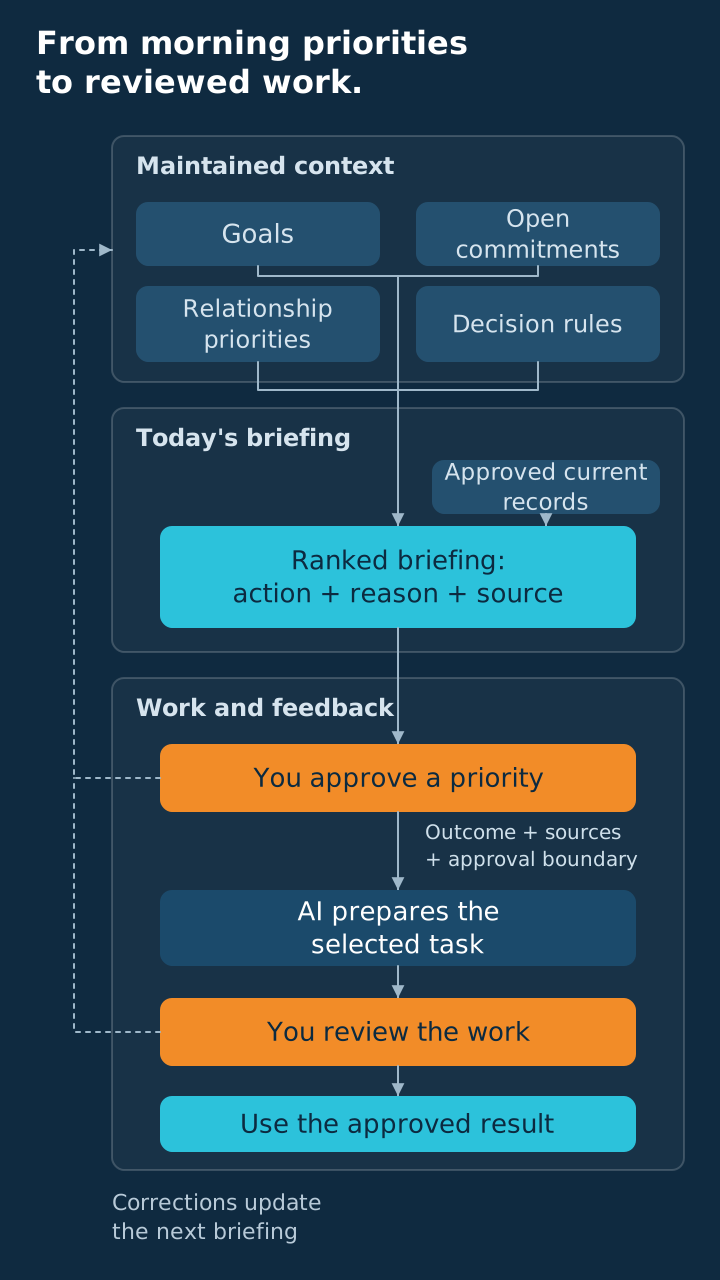
A standing AI briefing is a ranked list of your day's priorities, ready before you start work. An assistant that keeps standing context on your goals, commitments, and relationships builds it. You approve the order and hand items back for it to prepare. If your mornings are a pile of competing requests, build this before another one-off automation.
Key takeaways
- A standing AI briefing ranks your day using standing context.
- Give the assistant your goals, open promises, key relationships, and rules for ranking.
- Ask for the reasons behind the order, the supporting records, and the next action.
- Delegate preparation back to the assistant and keep consequential decisions yourself.
In the engagements we run, you get more from an assistant that understands how you think and prioritize than from another isolated automation. The briefing is where that understanding earns its place each morning. Your goals and commitments become a basis for deciding what needs attention, instead of background information you repeat whenever you ask for help.
A pattern we see: once the briefing ranks the day, you hand items back to the assistant to draft in your voice. That is where the time comes back. It has already assembled the context behind the task, so the handoff starts with a reason and a next action you can review.
You open the briefing before your first coffee, and at the top is the recap you promised a customer after yesterday's call. Below it sits the internal thread that pinged all night, while the recap includes the line from your notes where you made the promise. You approve the order, and the assistant drafts the recap for your review. The briefing has become the start of work.
Your briefing should settle the order, then start the work.
THE FOUNDATION
What context does your assistant need to rank the day?
Give it your operating priorities first. A briefing fails when the assistant lacks standing context about your goals, open commitments, and important relationships. The assistant can produce a tidy to-do list that still misunderstands what matters to you. The ranking needs standing context about your business, with instructions for choosing between competing demands.
Standing context is a document, not a memory you hope the assistant has. Keep it in one place it reads on every run, such as a project file or a pinned doc. Start with your current goals and the commitments that move them. Then spell out what makes something urgent in your business, like a customer promise or work that blocks a teammate.
Add the people and relationships that change how you handle a request, using only information the assistant is permitted to process. Describe roles, open commitments, and communication preferences that affect the work. Skip exhaustive biographies; give it enough context to draft the next action without misreading the relationship.
Standing context. One document the assistant reads on every run: what you are chasing right now, what you have promised, who matters, and how you break ties. Update it the day any of those change.
Your priority rules settle the conflicts that make a generic list feel plausible but wrong. Write them the way you would brief a new hire: "A promise to a customer beats internal cleanup, unless payroll is due." If a request is loud but off your current goal, say how you judge it. Turn every correction into a rule.
- Current goals: what you are trying to move forward.
- Open promises: what you promised and what remains unfinished.
- Important relationships: whose situation affects the next action.
- Decision rules: how you rank conflicting demands.
- Work limits: what it may draft or change.
This is the operating value behind AI context as a moat. The assistant gets closer to your judgment when its reference reflects how you actually run the business. Separate stable rules from the day's changing facts so an old request does not quietly become a permanent priority.
THE DAILY OUTPUT
What should a good standing briefing contain?
Every priority needs a reason and an action. You should finish reading with a decision about where to begin, what to delegate, and what needs your judgment. A briefing that only summarizes messages still leaves you to build the work plan. Ask for a ranked proposal that you can accept, correct, or narrow.
| Section | What it answers | Record it draws from |
|---|---|---|
| Ranked priorities | What should you do first, and why now? | Current goals, deadlines, and ranking rules |
| Commitments to protect | What have you promised that still needs action? | Open promises and your call notes |
| Decisions needed | What cannot move until you choose? | Pending requests and unresolved decisions |
| Preparation to delegate | What can it produce for you to check? | The task's evidence and work instructions |
| Missing or stale context | What needs checking before you trust the ranking? | Available records and their latest updates |
Make the ranking short enough that you can act on it, with the supporting detail available when you need to inspect a recommendation. An exhaustive inventory recreates the backlog you wanted help interpreting. Ask it to explain what fell below the cutoff when a tradeoff matters, so you can correct the choice without rereading everything.
For each recommended action, require the record and the reason it belongs in today's briefing. Separate a recorded promise from the assistant's inference about what should happen next. If an input is unavailable or outdated, the briefing should identify the gap beside the recommendation. That lets you decide if the item needs checking before it gets your attention.
Use a structure like this as your starting point. Replace the placeholders with information from the sources you chose, and keep the reason for each proposed task beside the action. The form should help you challenge the ranking and delegate the drafting. Do not ask the assistant to fill every heading when the evidence is missing.
TODAY'S PRIORITY
Action: [recommended next move]
Why now: [business goal or promise it serves]
Evidence: [record and latest verified update]
Your decision: [what needs your judgment]

PROMISE TO PROTECT
Promise: [unfinished promise]
Next action: [what moves it forward]
Evidence: [supporting record]

DELEGATE BACK
Preparation: [draft, comparison, or internal summary]
Inputs: [the sources you chose]
Approval required: [what stops for your review]

CHECK BEFORE ACTING
Missing context: [unavailable or stale information]
Question: [what you need to resolve]
THE SETUP
How can you set one up this week?
Run it by hand before you schedule it. Get the context and output format right first. A good answer in one chat proves the ranking can work. It does not prove the scheduled run can reach the same sources.
- Write a compact operating brief.
Describe your current goals, open promises, important relationships, and ranking rules in your standing context. Include a preference you can test, such as putting a promised customer deliverable ahead of internal housekeeping. Put access rights and approval requirements beside those instructions so the assistant knows how far the work can go.
- Supply a narrow set of current sources.
Choose records that show upcoming promises and unfinished work, then confirm it can read them for this run. Ask it to identify unavailable records and the latest update it relied on. If it cannot inspect a required record, supply a summary or reduce the scope before accepting the ranking.
- Run the briefing manually and correct the ranking.
Ask for the daily structure, read the supporting evidence, and correct the order before handing any task back. Record the reason behind your correction so it can improve its standing instructions. Test until the recommendation follows your operating priorities and flags missing evidence instead of smoothing over the gaps.
ChatGPT can run one-time or recurring tasks, and Gemini can schedule recurring actions. Either can deliver your briefing, but you still have to supply its standing context.
- Schedule a draft-only briefing and inspect the first runs.
Set a delivery time before you begin work, with instructions to draft the ranking and stop before consequential actions. Test the scheduled output against your operating brief and the information you expected it to use. Check the delivery time, access to the records, and content together so an on-time notification does not hide an incomplete briefing.
Test the actual run. Give it a ranking rule and a promise you can check. Verify that the scheduled briefing applies the rule, cites the promise, and flags missing inputs. Fix that path before expanding its scope.
Focus the first version on decisions you already make at the start of the day. You are trying to establish a routine that knows your business and produces work you can check. Once that loop works, add sources or briefing sections only when they improve the next decision. Every new input has to change a decision.
THE HANDOFF
What should you delegate back, and what should you keep?
Delegate the drafting; keep consequential judgment. The briefing should lead into work when you hand a chosen item back to it with an outcome and an approval rule. A request to prepare a customer recap is a different permission from a request to send it. State that limit in the handoff.
Vista's Agent-Does-the-Work framework puts the assistant to work on the reading and drafting that follow your chosen task. You decide which item matters and authorize what happens next, and it uses the assembled context to produce a reviewable result. That closes the gap between an interesting morning summary and work moving forward.
Good items to hand back include:
- A customer recap drafted from your call notes.
- An internal summary that identifies a stalled promise.
- A comparison of options using criteria you supplied.
- A meeting brief grounded in the records you chose.
Specify the outcome you want, the evidence it should use, and the point where it must stop for your review. If you need a draft in your voice, provide an example and say what relationship the message needs to preserve. Review the result before it reaches anyone whose response could change your promises or reputation.
Retain decisions about promises, spending, relationship tradeoffs, and unresolved uncertainty with you until a separate workflow supports a different approval rule. The daily briefing is a good place to surface those choices and assemble the evidence. It should not turn a recommendation into permission merely because the assistant presented the item at the top of the list.
Our guide to delegating work to AI safely describes how to define approval for a task. The briefing helps you find the task and assemble its context first. You can then delegate from a shared understanding of the job, which reduces the need to explain the same business situation again.
This is the shift we describe in how AI makes you the general. You spend the opening minutes deciding what should happen, not reconstructing why it matters. Then the work starts.
A ranked list becomes work when you hand back the next action.
THE FIT TEST
When is a standing AI briefing not worth it?
Skip it if you cannot maintain the context. A daily ranking built on stale promises or missing records gives you another document to correct before you can begin work. You need standing context you will update and a scope the assistant can actually support. Without those, recurring delivery only repeats the same weakness.
If a paper list already runs your morning and nothing slips, keep the paper list. Do not add a review just because an assistant can produce one. The test: will the briefing settle a call you struggle with, or gather evidence you now dig up by hand?
Start here when you regularly balance competing requests and then need help preparing the work that follows your choice. The context can serve both the ranking and the subsequent draft, so the setup supports a continuing working relationship. That is why we favor it as a first use of an assistant with standing context.
- Use it when ranking and drafting work are connected problems.
- Limit the scope when access to records is incomplete.
- Pause it when context maintenance costs more attention than it returns.
- Use your existing routine when it already serves the decision.
You should be able to tell what improved after reading and correcting the briefing. Look for better ordering, fewer missed promises, and drafts you can actually hand back and check. If the output mostly repeats a list you already understand, change its scope or stop. The routine needs to help you run the day.
If the ranking is credible but you never delegate anything back, inspect the handoff before adding another section to the briefing. The next action may be too vague, its evidence may be missing, or the approval rule may be unclear. Fix the obstacle that prevents work from moving, then decide if the daily format still pays off.
If you want help setting this up, bring three things to the Vista AI Collective. Bring the priorities you corrected, the sources the assistant missed, and the tasks you hesitated to hand back. Those examples turn a vague AI question into a specific fix.
COMMON QUESTIONS
Frequently asked questions
Start with context and an approval rule. A briefing should rank real promises, show its evidence, and draft the next actions you choose to delegate. These answers explain the distinction between a daily summary and a working assistant relationship. Use them to decide how much of the routine your business needs.
What is a standing AI briefing?
A standing AI briefing is a daily, ranked priority list prepared before you begin work by an assistant with standing context. It connects goals, promises, and ranking rules to recommended actions. You review the ranking and hand selected items back for drafting, with approval rules for anything that needs your judgment.
How is a standing briefing different from a daily summary?
A briefing recommends what to do next and explains the order, while a summary describes what happened or what is waiting. Require a reason, supporting evidence, and a next action for each priority. The briefing should also identify work you can delegate back, so the output becomes the start of drafting.
What information does the assistant need about my business?
Give it current goals, open promises, important relationships, ranking rules, and work limits in your standing context. Add the records you chose for the day's changing facts. Keep stable preferences separate from temporary circumstances, and ask it to flag missing or stale inputs. Correct the ranking by explaining the rule behind your decision.
Do scheduled tasks automatically create a standing briefing?
No. Scheduling handles recurring delivery, while the briefing still needs standing context and accessible records you chose. Write the operating brief, test the output manually, then inspect the actual scheduled run. Confirm that it applies your rules and shows its evidence before you rely on it to rank the day.
What should I delegate after reading the briefing?
Delegate preparation you can inspect, such as a draft recap, internal summary, comparison, or meeting note using the records you chose. State the outcome, inputs, and approval rule in the handoff. Retain consequential choices about promises, spending, and relationships with you until a separate workflow supports a different permission. Review work before releasing it.
When should I skip a standing AI briefing?
Skip it when you cannot maintain the context or your current routine already handles priorities without friction. Narrow the scope if it cannot reach the required records. Judge the routine by the decisions it improves and the work you can hand back. If it mostly repeats an understood list, change it or stop.
Frequently asked questions
- What is a standing AI briefing?
- A standing AI briefing is a daily, ranked priority list prepared before you begin work by an assistant with standing context. It connects goals, promises, and ranking rules to recommended actions. You review the ranking and hand selected items back for drafting, with approval rules for anything that needs your judgment.
- How is a standing briefing different from a daily summary?
- A briefing recommends what to do next and explains the order, while a summary describes what happened or what is waiting. Require a reason, supporting evidence, and a next action for each priority. The briefing should also identify work you can delegate back, so the output becomes the start of drafting.
- What information does the assistant need about my business?
- Give it current goals, open promises, important relationships, ranking rules, and work limits in your standing context. Add the records you chose for the day's changing facts. Keep stable preferences separate from temporary circumstances, and ask it to flag missing or stale inputs. Correct the ranking by explaining the rule behind your decision.
- Do scheduled tasks automatically create a standing briefing?
- No. Scheduling handles recurring delivery, while the briefing still needs standing context and accessible records you chose. Write the operating brief, test the output manually, then inspect the actual scheduled run. Confirm that it applies your rules and shows its evidence before you rely on it to rank the day.
- What should I delegate after reading the briefing?
- Delegate preparation you can inspect, such as a draft recap, internal summary, comparison, or meeting note using the records you chose. State the outcome, inputs, and approval rule in the handoff. Retain consequential choices about promises, spending, and relationships with you until a separate workflow supports a different permission. Review work before releasing it.
- When should I skip a standing AI briefing?
- Skip it when you cannot maintain the context or your current routine already handles priorities without friction. Narrow the scope if it cannot reach the required records. Judge the routine by the decisions it improves and the work you can hand back. If it mostly repeats an understood list, change it or stop.
Vista Insights
Get new posts in your inbox
Practical AI and advisory insights for operators, sent as they publish. No spam, unsubscribe anytime.

Founder, Vista Advising Group. Writes about using AI for real operating work.
Keep reading
- What's Stuck
Your Team's Workarounds Are Evidence, Not Failure
Use your team's workarounds to uncover unmet requirements and build a conservative case for better equipment.
- Using AI
Your Old Sales Calls Are a Re-Engagement List. Mine Them.
Use AI to recover stalled decisions from old sales calls, correct the timing, and draft re-engagement messages you approve yourself.
- Choosing an Advisor
Consignment, Wholesale, or Buy-Back Credit: Don't Become Your Retailers' Bank
Prefer paid wholesale with limited buy-back credit, price for the channel, and judge stockists by what happens after the first order.