
What's Stuck
Why Your Proposals Land in Spam (and the Sender Checklist That Fixes It)

Why Your Proposals Land in Spam (and the Sender Checklist That Fixes It)
A proposal in spam is a sender problem before it is a sales problem. Connect each sender's company mailbox to your quoting software, check the name and address your customer actually sees, and have your provider verify domain authentication. Then send a test, reply to it, and make sure a named person owns every inbox involved.
Key takeaways
- Inspect the address on a received proposal, not just the name shown inside your software.
- Connect each user's company mailbox and confirm the name and address on every account.
- Have your email provider verify domain authentication for the path your documents actually use.
- Publish a shared role address with assigned ownership, then test delivery and replies.
THE ROUTE
Which mailbox actually sends your proposals?
Fix the sending path first. In the engagements we run, proposals stopped landing in spam when staff connected their company mailboxes to the quoting system. Until then, every quote left through the software's generic address: a sender the customer had never heard of, mailing on your behalf.
Picture a customer calling to ask where the proposal went while your estimator points at a sent confirmation on screen. The customer opens the spam folder and finds a document under an unfamiliar name. Your team has been discussing price objections while the proposal was waiting somewhere the customer never checked. The price was never the problem.
- Which address actually sends your documents?
Why it matters: the address your customer receives is the starting point for diagnosing the delivery problem.
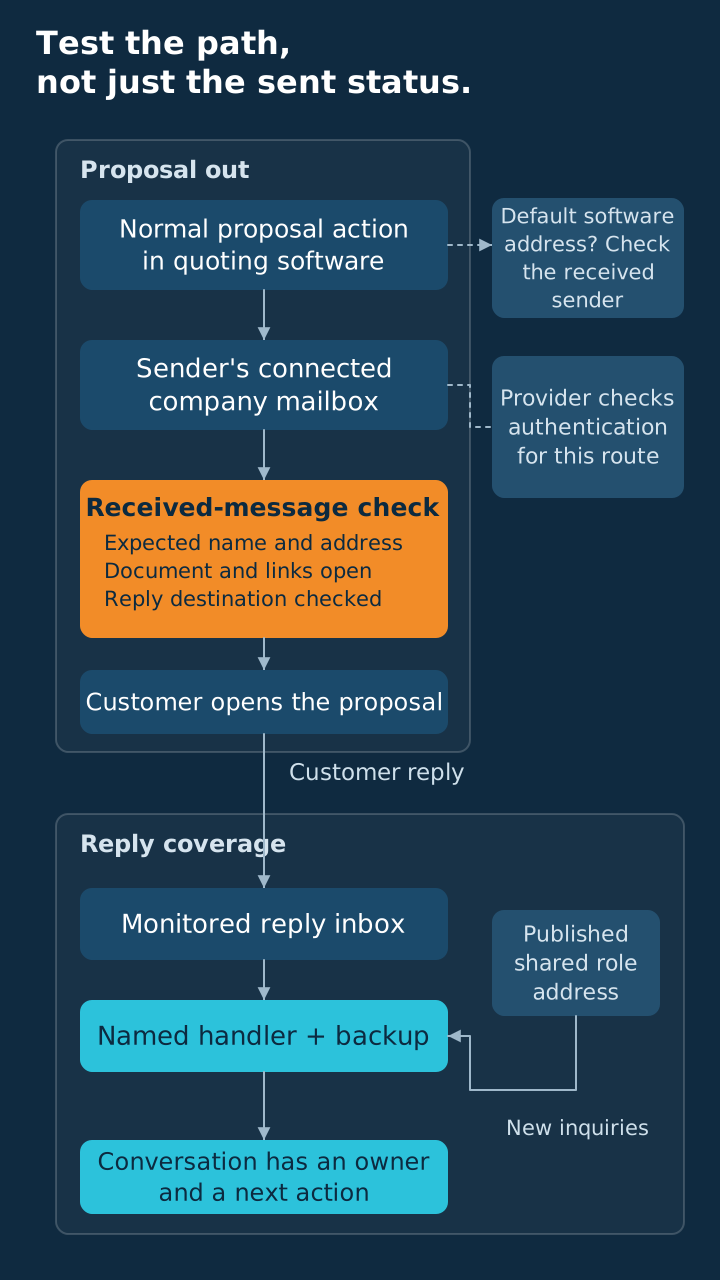
Send a sample through the same action your staff use for customer proposals, then inspect it in the receiving inbox. Expand the message details and record the address, display name, and reply destination before making changes to the settings. A logo on the proposal cannot tell you which mailbox sent the accompanying message.
Compare those details with the software's mailbox settings, and ask your email contact to explain any difference you cannot account for. Quotes, revisions, and reminders can each send from a different place. Test every one.
- Is each user's own company mailbox connected?
Why it matters: verifying each linked mailbox catches the staff still sending customer documents through the software's default address.
Our default is to connect each person's company mailbox using the software's supported method, then verify it with a received sample. Work through the staff who send documents and confirm the account they actually use when preparing a proposal. Another user's linked mailbox should never count as proof that their setup is ready.
Keep a short record of the user, connected mailbox, expected name, and person who inspected the received message. That record gives you a starting point when staff change roles or an account needs attention after a software change. Use an audit of the seams in your stack to trace the handoff between document software and email.
THE IDENTITY
Do customers recognize the sender, and is the domain authenticated?
Verify the person behind the address. In our engagement work, we found a mailbox connection quietly tied to the wrong identity. Customer documents went out under a name the customer did not recognize, even though staff believed they were sending from the expected account.
- Does the sender name match what customers expect?
Why it matters: a familiar address can still create confusion when the name attached to it points to someone else.
Inspect the received name beside the address, and compare it with the person or team introduced during the sales conversation. Ask each staff member to confirm those details from a sample message before using a newly connected mailbox for customer documents. Make recognition part of acceptance, alongside the address itself.
Read the signature as well, so the name in the message agrees with the person shown at the top. A reassigned account can leave behind details that make the document look as though it came from someone outside the conversation. Correct the linked mailbox and message template together, then send another sample.
- Has your provider verified domain authentication for this sending path?
Why it matters: a connected mailbox does not prove your domain is authenticated, and Google requires authentication from anyone sending to personal Gmail accounts.
Google's sender requirements say anyone sending to personal Gmail accounts must set up SPF or DKIM for their sending domain. Senders of 5,000 or more messages a day to Gmail accounts must set up SPF, DKIM, and DMARC. Most small businesses sending proposals fall under the all-senders rule, SPF or DKIM.
Our default: ask your provider for all three. You meet the stricter standard and stop guessing which tier applies to you. Setting up DMARC as well is good practice even when your business falls below the bulk threshold.
Leave the DNS work to whoever maintains your email and domain. Your job is to hand them the paths your staff actually use and ask one question. "Has this been checked on the path our proposals take?"
THE INBOX
Who owns new inquiries and customer replies?
Assign the inbox work. In the engagements we run, scattered personal inboxes left inquiries unmonitored until a shared role address replaced them. Once one person owned it, with a named backup, inquiries stopped sitting unanswered.
- Do you publish a shared role address with named ownership?
Why it matters: customers need a dependable entry point, and your staff need to know who takes the next action.
Use a role address for published inquiries so a customer's first message reaches a business function with defined coverage. Assign a primary person and a backup, then agree how they will claim new requests and hand over unfinished conversations. A role address with no owner is one more inbox nobody checks.
Give your team a way to distinguish an unanswered inquiry from a conversation already being handled by someone else. Decide what acknowledgment, assignment, and completion look like before replacing scattered addresses on your contact materials. You want incoming work to have a next action that another staff member can understand.
- Do proposal replies reach a monitored inbox?
Why it matters: receiving a customer's reply is only helpful when someone is assigned to read it and respond.
Reply to your received sample and follow the response all the way back to the business inbox. Ask the assigned staff member to confirm receipt and show how that reply would enter the normal customer workflow. Inspect the actual destination even when the outgoing address looks right, because your team needs proof of the return path.
Use the shared address for first contact and the estimator's own mailbox for the proposal. The customer met a person, so the proposal should come from that person. Then decide who covers each inbox when that person is out.
Write the handoff rule down:
- Name who reads incoming inquiries and proposal replies.
- Identify the backup when that person is unavailable.
- State how unfinished conversations transfer between staff.
See where outsourced follow-up breaks when a message arrives but nobody takes the next action. Your sending setup and follow-up process meet at the inbox, so trace that handoff with the people expected to maintain the conversation.
THE TEST
What should you test before sending the next proposal?
Test the complete customer experience. A "sent" status only proves the message left your software. What you need to know is if your customer can find it, recognize it, and reply.
- Have you sent a sample to a fresh personal account?
Why it matters: a fresh receiving inbox shows what arrived through the path you are trying to fix.
Use a fresh personal account with no existing conversation with your company, keeping customer information out of the sample document. Note where the message lands, what name appears, and where a reply goes after you send it back. Keep the received message so the person maintaining your email can inspect the evidence if delivery still fails.
Treat that result as proof of the path you tried, and repeat it for staff or document actions using different mailboxes. Avoid changing several settings at once, since that makes it harder to tell which correction affected the result. Record the action you changed and run the same sample again afterward.
- Are the attachments and links appropriate for this customer document?
Why it matters: a focused message is easier for your customer to recognize, open, and discuss with your team.
Keep the email focused on the requested proposal, using the attachment or document link your process expects the customer to receive. Open the sample attachment and follow its links as a recipient would, including any steps required to access the document. Remove unrelated material that makes the message harder to understand or the requested action harder to find.
Inspect the received message:
- The name and address match the expected relationship.
- The document opens and contains the intended sample content.
- Links lead to the destination described in the message.
- A reply reaches the person assigned to handle it.
After changing the mailbox or template, send again through the software instead of sending a substitute message directly from your inbox. You are trying the document workflow that customers experience, so the sample must travel through the same steps your staff will use. Keep the resulting notes with the account record for the next person who troubleshoots it.
THE FOLLOW-THROUGH
What should you tell customers when a proposal goes missing?
Help them find the message. Then use what they report to diagnose delivery before assuming their silence means your price missed the mark. Your customer should hear a practical next step while your team investigates the path behind the missing document.
- Have you told the customer what sender and subject to look for?
Why it matters: specific search details help your customer find the message while you investigate the delivery path.
Tell the customer the expected name, address, and subject, then ask them to search spam or junk if the proposal is missing. If they find it, ask which address appeared and use that detail to compare the message with your account record. Offer to resend after correcting the sending path, or arrange another delivery method the customer agrees to use.
Match the symptom to the likeliest cause below, then prove it with a received message before you touch a setting.
| Symptom | Likely cause to investigate | The fix |
|---|---|---|
| A proposal appears in spam under a generic address | The default software address is still active | Connect the intended company mailbox and inspect the received proposal |
| The sender name is unfamiliar | A linked mailbox or template carries the wrong identity | Correct both the name and signature, then send another sample |
| The address looks right but delivery still fails | Authentication or another delivery issue needs investigation | Give your email contact the received sample and sending path to inspect |
| A customer replied but nobody followed up | Replies reach an inbox without assigned coverage | Correct the reply destination and assign primary and backup staff |
| New inquiries sit unanswered | Published addresses split incoming work across people | Use a shared role address with an assignment and coverage rule |
Real-Constraint Lens. Vista's framework traces recurring friction to the condition limiting the work. Confirm the proposal reaches your customer before diagnosing a pricing or persuasion problem.
Once delivery and reply handling work, return to answering the price question first in the proposal itself. Delivery first, persuasion second. Your customer needs the document to arrive and the content to answer the buying question. Keep your delivery findings attached to the process so the same issue can be recognized if it returns.
If you need help tracing the break, book a Vista working session with your sending paths and received samples ready. We can use that evidence to locate the problem across document software, linked mailboxes, and inbox ownership. Start with the path the proposal takes and the staff expected to carry the conversation forward.
PRACTICAL ANSWERS
Frequently asked questions
Check the received message first. These answers help you separate the sending path, unfamiliar names, and inbox work when a proposal goes missing.
Why can a proposal land in spam even when the software says it was sent?
The software's send confirmation does not show where the customer found the message. Send a sample through the same document workflow and inspect it in a receiving account. Record the name, address, and reply destination, then give your email contact that evidence if the delivery problem continues.
Should every person who sends proposals connect a company mailbox?
Our default is to connect each person's company mailbox through the software's supported method and verify it with a received sample. Inspect the address, display name, and reply destination for each account. A working setup for another user does not establish that your own sending path is ready.
Can the wrong sender name cause problems even if the proposal is correct?
An unfamiliar name can leave your customer unsure who sent the proposal. Compare the name shown in the message with the person or team introduced during the conversation. Correct the linked mailbox and signature together, then send again. Verify who appears in the message whenever you change the account.
Who should handle email authentication for your domain?
Ask the person who maintains your email and domain to verify authentication against the path your proposals actually use. Supply a received sample and a record of the linked mailbox. Have them follow the email service's official help instructions, then try the document workflow again after any correction.
Should you send every proposal from a shared role address?
A shared role address gives published inquiries a business entry point with assigned coverage. Your proposal can come from the recognizable person handling the customer relationship. Decide who reads each inbox and who covers absences, then try replying. The shared address and personal company mailbox need coordinated ownership.
What should you ask a customer to check when a proposal is missing?
Give the customer the expected name, address, and subject so they can search for the specific message. Ask them to search spam or junk and tell you which address appears if they find it. Use that evidence to inspect delivery, then agree on a way to send the document.
Frequently asked questions
- Why can a proposal land in spam even when the software says it was sent?
- The software's send confirmation does not show where the customer found the message. Send a sample through the same document workflow and inspect it in a receiving account. Record the name, address, and reply destination, then give your email contact that evidence if the delivery problem continues.
- Should every person who sends proposals connect a company mailbox?
- Our default is to connect each person's company mailbox through the software's supported method and verify it with a received sample. Inspect the address, display name, and reply destination for each account. A working setup for another user does not establish that your own sending path is ready.
- Can the wrong sender name cause problems even if the proposal is correct?
- An unfamiliar name can leave your customer unsure who sent the proposal. Compare the name shown in the message with the person or team introduced during the conversation. Correct the linked mailbox and signature together, then send again. Verify who appears in the message whenever you change the account.
- Who should handle email authentication for your domain?
- Ask the person who maintains your email and domain to verify authentication against the path your proposals actually use. Supply a received sample and a record of the linked mailbox. Have them follow the email service's official help instructions, then try the document workflow again after any correction.
- Should you send every proposal from a shared role address?
- A shared role address gives published inquiries a business entry point with assigned coverage. Your proposal can come from the recognizable person handling the customer relationship. Decide who reads each inbox and who covers absences, then try replying. The shared address and personal company mailbox need coordinated ownership.
- What should you ask a customer to check when a proposal is missing?
- Give the customer the expected name, address, and subject so they can search for the specific message. Ask them to search spam or junk and tell you which address appears if they find it. Use that evidence to inspect delivery, then agree on a way to send the document.
Vista Insights
Get new posts in your inbox
Practical AI and advisory insights for operators, sent as they publish. No spam, unsubscribe anytime.

Founder, Vista Advising Group. Writes about using AI for real operating work.
Keep reading
- Using AI
What Is a Standing AI Briefing, and Should Your Day Start With One?
A standing AI briefing ranks your day using standing context, then drafts the work you choose to hand back for a check.
- What's Stuck
Your Team's Workarounds Are Evidence, Not Failure
Use your team's workarounds to uncover unmet requirements and build a conservative case for better equipment.
- Using AI
Your Old Sales Calls Are a Re-Engagement List. Mine Them.
Use AI to recover stalled decisions from old sales calls, correct the timing, and draft re-engagement messages you approve yourself.