
Using AI
Is a Dedicated Computer for an Always-On AI Agent Worth It?

Is a Dedicated Computer for an Always-On AI Agent Worth It?
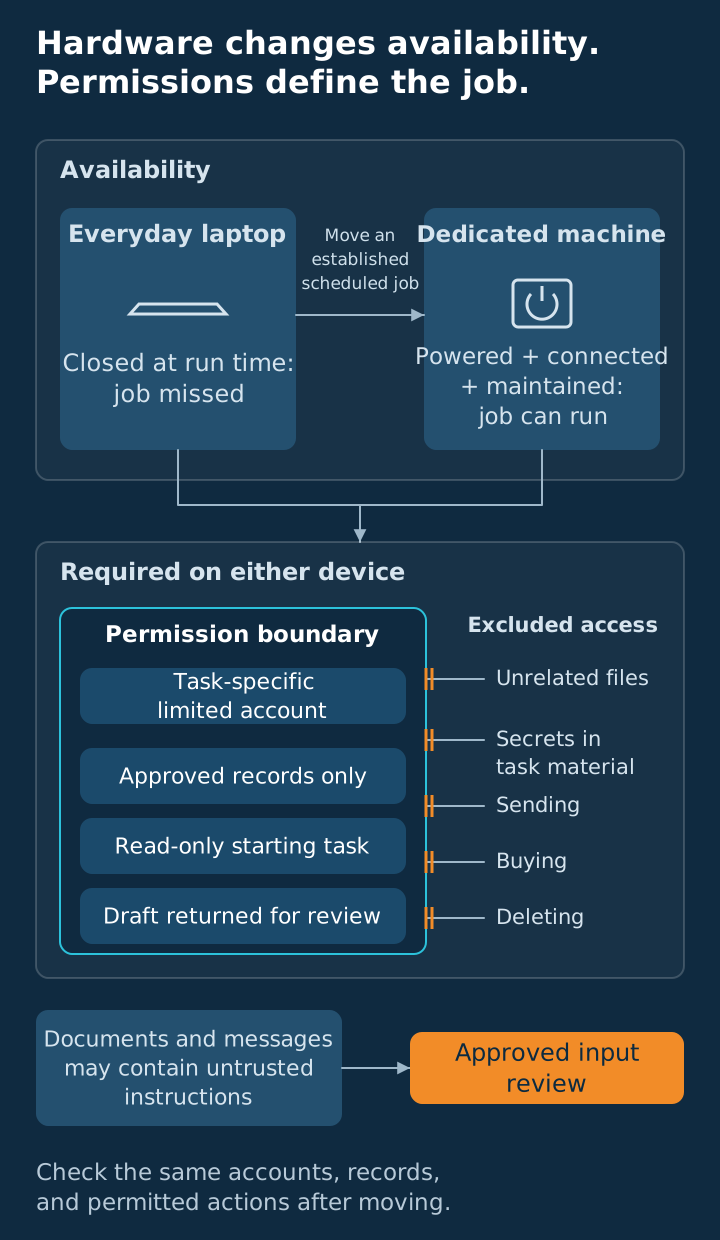
Dedicated hardware is worth it for uptime. Start on your everyday machine with a low-risk, read-only assignment, then move when scheduled work needs to run while your laptop is closed. Limit its logins and actions first, and use physical separation as one part of a boundary you can enforce.
Key takeaways
- Buy dedicated hardware when an established schedule needs dependable availability.
- Reduce account access and permitted actions before changing devices.
- Start with low-risk, read-only work on the computer you already use.
- Keep credentials and unrelated files outside the agent's working material.
- Move the same narrow access with the assignment, then verify its operation.
THE VERDICT
What problem does a dedicated computer solve?
Buy for a running schedule. A dedicated computer earns its place when a scheduled run you already depend on needs to happen while your usual machine is unavailable. Give the purchase a named assignment and an operating requirement before you make space for another device that somebody will need to maintain.
In the engagements we run, teams buy a separate computer "for safety" before the agent has done a job worth keeping. The purchase changes where the agent runs while the same logins and permissions travel with it. The machine changed none of the real risks. You just added a box to maintain.
| Reason you are considering it | Does a dedicated machine help? | What actually helps |
|---|---|---|
| Jobs must run while your laptop is closed or traveling | Yes, if the new setup stays powered, connected, and running | A maintained schedule, job monitoring, and someone handling failures, or a hosted service that runs the schedule for you |
| You want protection from malicious instructions in a document | Hardware alone does not address that risk | Narrow data access, restricted actions, and review before consequential work |
| You want to keep ordinary personal files away from the agent | It can help if those files and accounts stay off the new setup | A separate working area and accounts limited to the task |
| You have not found a job worth keeping | There is no established uptime problem to solve | A small, supervised trial on your everyday machine |
| The agent has broad business logins | Moving the logins leaves their access unchanged | Separate accounts and the smallest permissions the job needs |
A pattern we see often: the risk lives in what the agent is connected to and allowed to do, not where it runs. Decide which task to allow and how you will check its result first, before adding another connection.
The risk lives in the logins, not the box.
A missed run. You close your laptop before leaving for a site visit, then later look for the scheduled supplier update and find that the job never ran. You wanted a prepared summary waiting for review, but the machine running the task was unavailable while you were away. That gives the hardware question a purpose: keep an established job running when your laptop cannot support it.
THE EXPOSURE
Which risks follow the agent to another device?
Fix access before moving the agent. Look at the material it can read, the accounts it can use, and the actions it can take without your review. List its connections and permitted actions, then decide which ones the assignment actually needs before granting access to the next account.
Anthropic's prompt injection guidance describes how instructions hidden in third-party content, including emails and documents, can try to redirect an agent reading on your behalf. Our practical conclusion: moving the computer does not remove untrusted content from the task you assigned.
The same page recommends least privilege: don't give the model secrets it doesn't need. Run tools in sandboxed environments, and scope permissions as narrowly as possible. A separate machine can be part of that sandbox. It is never the whole of it.
Only your instructions steer the job. Anything inside a document, email, or web page that reads like an instruction is content to report, not a command to follow. Anthropic's guidance gives the same rule. Flag the request so you can decide what happens next.
Minimum Blast Radius. Vista's framework starts with the smallest set of information, accounts, and actions needed for the task. Define that boundary before choosing hardware, then keep it in place as the job grows.
Check credentials separately from the job description, so a password or access key does not become ordinary material the agent is asked to summarize. Use the tool's designated connection settings and keep copied secrets out of task notes, prompts, and source folders. If a setup asks for access you cannot explain, stop connecting accounts until you understand the request.
Read-only is our starting point because it lets you inspect an output before allowing changes to a business system. It still needs narrow reading access, since an assignment does not need permission to read every file simply because it cannot edit them.
Read-only is not the same as safe. An agent that can read your files and also send email or open web pages can leak what it read. A document can tell it to do exactly that. Keep the first job's output in a place only you can see.
- Read only the folder or records needed for the assigned task.
- Keep unrelated business information and personal files outside that working area.
- Remove sending, deleting, buying, or account-changing actions from the starting job.
- Review the result before anyone uses it to make a commitment.
Write down how you will revoke each connection and stop the process before you depend on it for regular work. Someone should be able to follow that plan if you are away when the system does something unexpected. Our guide to delegating work to AI safely develops those access and authority decisions before you grant broader control.
THE FIRST JOB
How should you start on your everyday computer?
Start with a read-only draft. Choose an assignment you can supervise from beginning to end, using material you have selected for that purpose and an output you will inspect. A summary of approved documents is a better starting point than a broad request to manage the accounts your business relies on.
Begin in a separate working area: its own folder, plus a separate browser profile or user account on your computer. Sign into nothing but the task account. Never point an agent at the browser where your email and bank are logged in.
- Name the output: a draft summary for your review, with references to its source material.
- Limit the inputs: approved files or a narrowly scoped, read-only connection.
- Separate the account: use a task account where the connection supports one.
- Remove extra authority: keep sending, editing, purchasing, and deleting outside the first assignment.
- Review each run: compare the result with its sources and inspect the work the agent attempted.
Separate accounts need restricted permissions to serve this purpose, so a second account with full administrator access misses the point of the setup. Grant only the records and actions the assignment requires, and test what the agent can actually reach. If the connection cannot provide the boundary you need, leave it out of the trial.
Write the assignment as a bounded request that tells the agent which material to read and what to return for your inspection. Include how to handle a missing source or a request inside the content that falls outside the scope. Our default is to flag the issue and stop that part of the work until you decide the next action.
- Input boundary: the approved records or working folder.
- Output boundary: a draft kept in a location only you can see.
- Stop condition: missing access, unexpected instructions, or a request to expand the job.
- Reviewer: the person who verifies the draft and handles anything the run flags.
Run the assignment while you can watch and interrupt it, then examine both its output and any attempted steps beyond the agreed scope. An accurate-looking summary does not settle how the process behaved while producing it. Ask for a readable record of what happened, and keep the trial small enough that you can inspect it yourself.
For browser-based work, using an agent when there is no API examines that interaction route. Limit this trial to the smallest assignment and account you can supervise, whatever route you use. Decide how to run it continuously after you have established work worth repeating and a boundary you can maintain.
THE MOVE
When is it time to move the job?
Move when availability becomes the constraint. In our engagements, the reason to move is scheduled work that needs to run while your laptop is closed or traveling. You should be able to explain the missed run, its required timing, and who uses the output before treating dedicated hardware as the next step.
Separate the need to keep a task running from a desire to make it sound more advanced, especially while you are still testing its value. A box humming in the corner is not a strategy. If you launch the run yourself and wait for its draft, your laptop may already support the workflow. A dedicated setup makes sense when that arrangement repeatedly conflicts with the schedule you need to maintain.
Check the operating conditions before moving
- The machine stays powered and connected when the schedule needs it.
- The process can run under the intended account with its limited permissions.
- Someone receives a failure notice and knows what to do next.
- You can pause the run and revoke its connections if the behavior changes.
- Updates and maintenance have a named person and an agreed time.
- The agent runs under a standard user account, not an administrator.
- Nobody opens remote access to the machine until whoever maintains your IT has locked it down.
A computer left on needs a maintained schedule behind it, so verify the output to confirm the device is doing the work. Decide how you will notice a missing summary or an interrupted login. Make failures understandable to the person maintaining the process, with a way to pause it while they investigate.
Move the narrow assignment and access you tested, then compare the new setup with the working trial before you allow it to run unattended. Confirm that the source folders, account access, and output destination still match what you approved. Keep the ability to interrupt a run while you work through any differences between the setups.
Distinguish this decision from running AI locally or in the cloud. This purchase is about the computer keeping the agent's schedule available, while the model's location is a different choice. Name the process that needs to remain running so you can judge what a fixed device would actually support.
THE DECISION
Is dedicated hardware worth it for your business now?
Earn the machine with a working job. Decide from the schedule and the operating burden you can support, with access already narrowed to the assignment. You should know what output you are protecting from interruption and who will maintain the setup before adding a device to your business.
Worth it if
- An established schedule must run while your usual computer is unavailable.
- You have defined the assignment's inputs, outputs, permissions, and stop conditions.
- You can keep the setup powered, connected, and maintained.
- Someone inspects outputs, receives failure notices, and can pause the process.
Not worth it if
- You are still looking for work that earns its place in your workflow.
- You expect the hardware to settle broad account access or credential handling.
- A supervised run on your usual machine meets the current need.
- Nobody has agreed to maintain the device and deal with failed runs.
Choose your next action without expanding the scope, especially if you are still learning what the agent does well. For a new assignment, supply approved material and inspect a read-only draft on the computer you already use. For an established schedule, document the availability requirement and plan the move around it.
Bring the assignment and its current account access to Vista's AI Lab if you want help defining the scope or planning the move. The hardware decision should follow the work you need done and the boundaries you can enforce. Preserve that narrow authority when the schedule grows, even after it has its own machine.
PRACTICAL ANSWERS
Frequently asked questions
Start with the assignment and its access. These answers help you judge the need for continuous operation without skipping the account and inspection decisions that belong with the work. Decide what you want the agent to read and return before choosing where the process should remain running.
Does a dedicated computer make an AI agent safe?
No. A dedicated computer can support availability and keep ordinary local files separate if you leave them off that setup. It does not settle what the agent's connected accounts can read or change. Define narrow permissions, keep credentials outside working material, and review consequential actions before treating the hardware purchase as protection.
What is the best reason to buy a dedicated machine?
Buy dedicated hardware when an established job must run while your everyday computer is closed, traveling, or otherwise unavailable. Name the task, required timing, and person using the result. Plan power, connectivity, maintenance, and failure handling before moving. The machine should support a schedule your current arrangement cannot reliably meet.
Can you start an agent on your everyday laptop?
Our default is a small, supervised, read-only task on your everyday computer. Use approved material in a separate working area and a narrowly scoped account where available. Keep unrelated files and consequential actions outside the assignment. Review the output and attempted actions before repeating the job or expanding its access.
Why does prompt injection matter when choosing hardware?
Anthropic's prompt injection guidance describes instructions embedded in third-party content as a way to try to redirect an agent. Moving the computer does not remove that content from the assigned task. Keep the job bounded, restrict what it can reach, and review results before allowing actions that affect your business.
What does Minimum Blast Radius mean for an agent?
Vista's Minimum Blast Radius framework gives a task the smallest set of information, accounts, and actions needed to complete it. Start with approved inputs and a draft you review. Keep extra authority outside the job, then check the boundary again when you add a connection or move to another machine.
What should you check before moving a scheduled job?
Confirm power, connectivity, account access, output location, and the way someone will learn that a run failed. Keep the tested permissions and stop conditions in place, with a named person able to pause the task. Check the moved job against the working trial before relying on it to run unattended.
Frequently asked questions
- Does a dedicated computer make an AI agent safe?
- No. A dedicated computer can support availability and keep ordinary local files separate if you leave them off that setup. It does not settle what the agent's connected accounts can read or change. Define narrow permissions, keep credentials outside working material, and review consequential actions before treating the hardware purchase as protection.
- What is the best reason to buy a dedicated machine?
- Buy dedicated hardware when an established job must run while your everyday computer is closed, traveling, or otherwise unavailable. Name the task, required timing, and person using the result. Plan power, connectivity, maintenance, and failure handling before moving. The machine should support a schedule your current arrangement cannot reliably meet.
- Can you start an agent on your everyday laptop?
- Our default is a small, supervised, read-only task on your everyday computer. Use approved material in a separate working area and a narrowly scoped account where available. Keep unrelated files and consequential actions outside the assignment. Review the output and attempted actions before repeating the job or expanding its access.
- Why does prompt injection matter when choosing hardware?
- Anthropic's prompt injection guidance describes instructions embedded in third-party content as a way to try to redirect an agent. Moving the computer does not remove that content from the assigned task. Keep the job bounded, restrict what it can reach, and review results before allowing actions that affect your business.
- What does Minimum Blast Radius mean for an agent?
- Vista's Minimum Blast Radius framework gives a task the smallest set of information, accounts, and actions needed to complete it. Start with approved inputs and a draft you review. Keep extra authority outside the job, then check the boundary again when you add a connection or move to another machine.
- What should you check before moving a scheduled job?
- Confirm power, connectivity, account access, output location, and the way someone will learn that a run failed. Keep the tested permissions and stop conditions in place, with a named person able to pause the task. Check the moved job against the working trial before relying on it to run unattended.
Vista Insights
Get new posts in your inbox
Practical AI and advisory insights for operators, sent as they publish. No spam, unsubscribe anytime.

Founder, Vista Advising Group. Writes about using AI for real operating work.
Keep reading
- Choosing an Advisor
A Referral Partner Is Only Worth It If They Reach Customers You Don't
Test customer overlap and referral timing before committing to a partner, then share approved assets and track the new reach they create.
- Reading the AI Landscape
Rent the Core, Own the Glue
Keep the specialized platform that works, buy on available access, and own a narrow bridge with clear rules, maintenance, and a fallback.
- Choosing an Advisor
Go Narrow on Ads, But Not Below the Floor
Focus a small ad budget on high-fit prospects, check the campaign's delivery floor, and choose personal channels when the audience is too small.